One of Gmail’s neat new features involves being able to attach or save content directly to GoogleDrive for storage purposes. No more sending large attachments via email, you can just point to GoogleDrive.
How do you accomplish the same if you’re using Dropbox or some other cloud storage solution? Give Kloudless, a Google Chrome browser extension, a try!
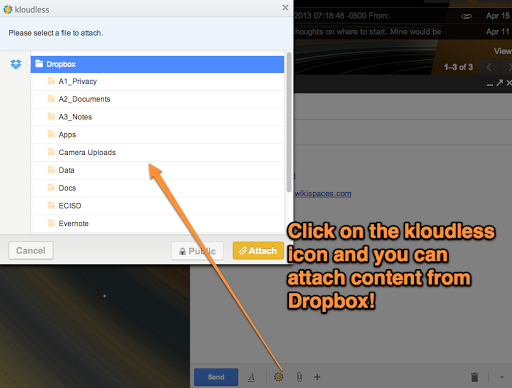
Main features include the following:
- Kloudless offers a simple, secure way to move attachments between your email inbox and other cloud storage services.
- Send files of any size by attaching them from the cloud to a newly composed email with Kloudless.
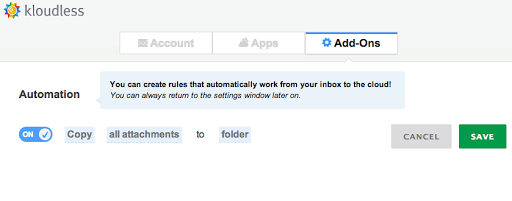
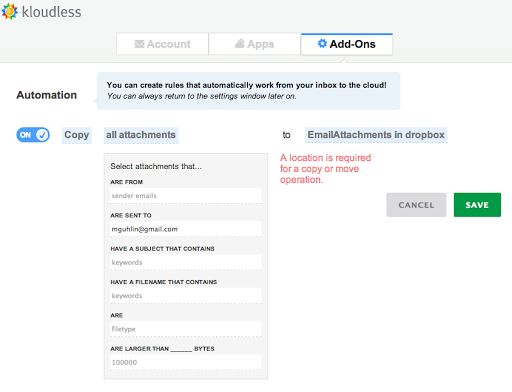
- Move attachments you receive directly into your favorite cloud service.
- Kloudless encrypts your information in transfer and at rest with bank level security.
Check out Miguel’s Workshop Materials online at http://mglearns.wikispaces.com

var _gaq = _gaq || []; _gaq.push([‘_setAccount’, ‘UA-3445626-5’]); _gaq.push([‘_setDomainName’, ‘mguhlin.org’]); _gaq.push([‘_trackPageview’]); (function() { var ga = document.createElement(‘script’); ga.type = ‘text/javascript’; ga.async = true; ga.src = (‘https:’ == document.location.protocol ? ‘https://ssl’ : ‘http://www’) + ‘.google-analytics.com/ga.js’; var s = document.getElementsByTagName(‘script’)[0]; s.parentNode.insertBefore(ga, s); })();
Discover more from Another Think Coming
Subscribe to get the latest posts sent to your email.
 Another Think Coming