

The short version
Miguel documents building a browser-based Castles and Catapults game with Codex, using the project to reflect on vibe coding, iteration, and attribution.
When I was a thirteen year old in high school, one of my favorite things to do was to visit the computer lab. It was full of TRS-80s, and one of the few games available was, “Castles and Catapults.” I still remember laughing in delight as my missiles crashed into my opponent’s castle. Unfortunately, when I moved onto Apple //e computer, stopped taking computer basics class (I passed but barely…I couldn’t code much more than a few lines in FORTRAN and BASIC), I lost access to the TRS-80 game, and never played it again. But it was one of the first games ever that caught my imagination. I thought I would never play it again…until today.
Play the game now!
(it has dorky sound effects)
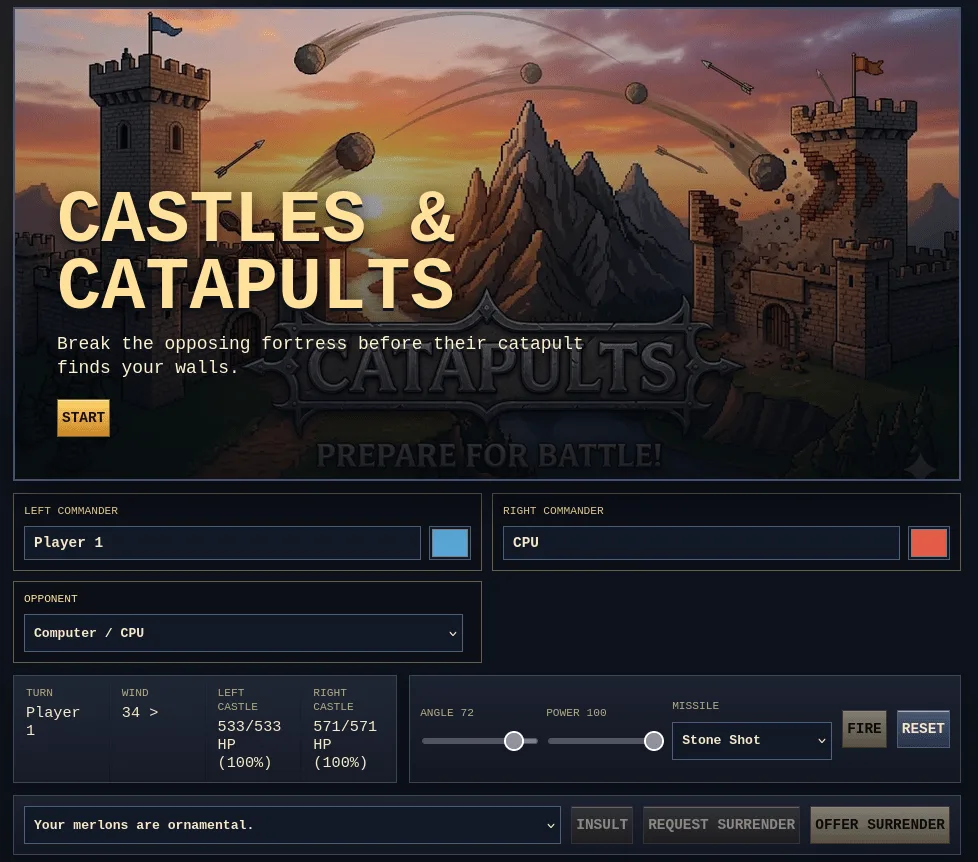
View ReadMe - This game took 80 minutes to make.
“Be not elated at any excellence which belongs to another. If a horse should be elated and say, ‘I am handsome,’ it might be endurable. But when you are elated and say, ‘I have a handsome horse,’ know that you are elated at what belongs to the horse.” (Epictetus’ Enchiridion)
I am keeping that Epictetus quote in mind so I don’t take pride in the Gen AI’s work as if it were MY work. I haven’t suffered any cognitive offloading or atrophying…since I can’t code AT ALL. I just love the fact that I can ride the horse and jump over obstacles (e.g. coding) I have never been able to overcome in a much shorter period of time.
Codex Token usage:
- **total=**1,075,503
- input=1,003,555 (+ 20,903,424 cached)
- output=71,948 (reasoning 9,463)
Background Info
While working on another project for work, the crazy idea popped into my head. Why not vibe-code the game into existence? This time, I could make improvements. I thought about it on my commute from work back to home. After dinner, I gave it a go with my ChatGPT Codex ($20 a month) account…according to Codex, it took about 1 hour and 10 minutes (see token usage above). The time flew!
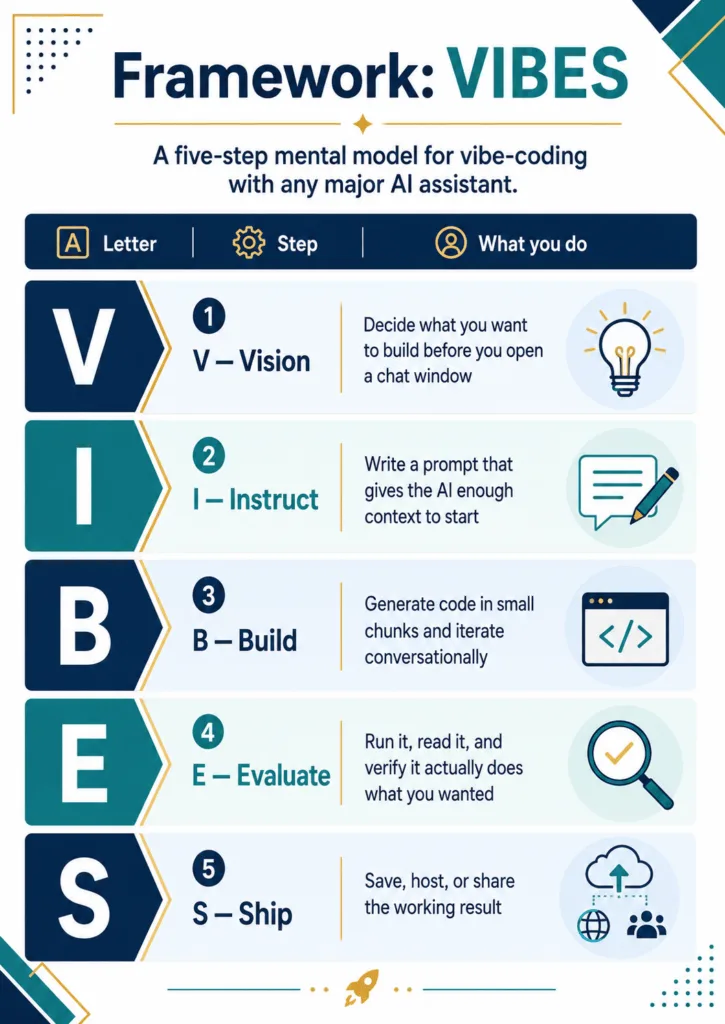
VIBES Framework
For fun, I adapted the VIBES (well, I had Gemini adapt it) you see above. You can see the broad strokes of VIBES above (source). The details, which I had ChatGPT modify AFTER game development was done, look like this:
Project Mapping: Castles & Catapults
Letter
Step
What you do for this game
V
Vision
Build a standalone, single-page retro artillery siege game. Two grey medieval castles face each other across randomized no-man’s-land terrain. Players tune angle, power, and missile type, then trade arcing shots that damage castle HP, scatter armies, crater terrain, and trigger humorous battlefield commentary.
I
Instruct
Specify an HTML/CSS/JavaScript-only implementation with an 800 x 400 pixel-art canvas, responsive controls, rotating splash art, local setup fields, CPU-or-human opponent choice, turn phases, projectile physics, destructible castle segments, soldier units, randomized scenery, procedural sound, and no external dependencies.
B
Build
Implement in layers: 1. splash/setup UI; 2. canvas renderer; 3. terrain and random sky/no-man’s-land generation; 4. hollow grey castles with pennants and shields; 5. armies and moats; 6. projectile selection and physics; 7. collisions and HP; 8. CPU turns; 9. quips, insults, retorts, soldier laments, and audio polish.
E
Evaluate
Playtest for readable UI, clear castle silhouettes, fair CPU accuracy, projectile variety, legible soldier formations, useful HP readouts, and satisfying audio. Check desktop and mobile layouts, especially text wrapping, control density, and canvas visibility.
S
Ship
Deliver as index.html plus an assets/ folder. Splash images can be added as assets/splash.jpg, assets/splash-2.jpg, and assets/splash-3.jpg; the game chooses one randomly each reload and falls back gracefully if only one exists.
Current Design Priorities
- Readable siege fantasy: Castles should feel like grey stone fortifications, not colored blocks. Player colors belong on flags, pennants, shields, and army heraldry.
- Clean playfield: Weapon choice is visible in the controls and projectile art, but siege engines are not physically drawn on the castles to avoid clutter.
- Characterful battlefield: Random time-of-day skies, constellations, trees, lakes, stakes, moats, armies, quips, insults, retorts, and soldier laments give each match personality.
- Fair artillery: CPU should not win immediately. Its first shot is intentionally rough, and later shots remain imperfect.
- Standalone simplicity: Everything should run from static files in a browser with no build step, framework, package install, or server requirement beyond ordinary local file/HTTP serving.
Game Instructions
After thinking about it a bit, I had Gemini develop a “game.md” file that, if you copy, you can use to develop your own.
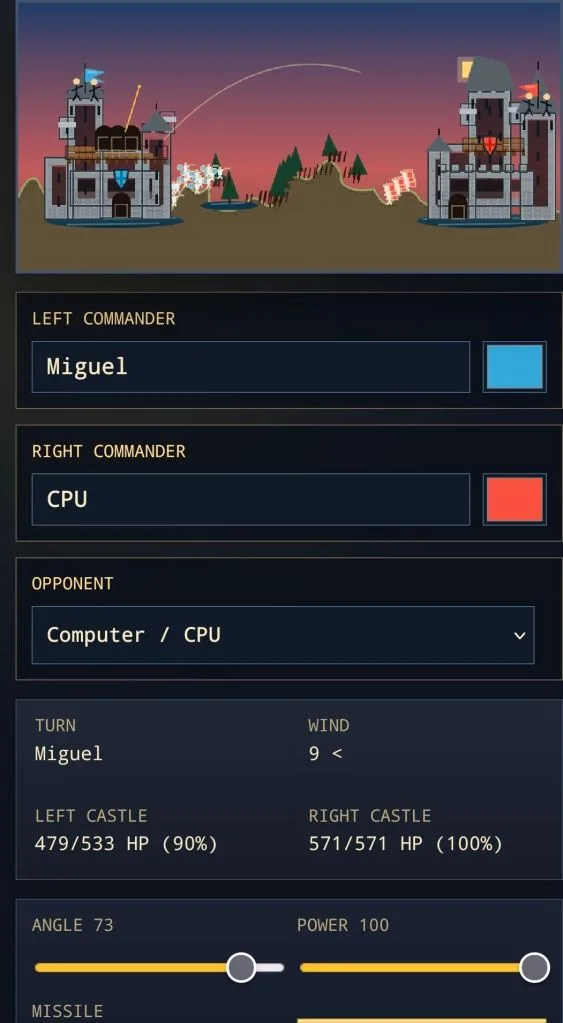
Mobile version
Castles & Catapults: Rebuild Specification
This document describes how to recreate the current game from scratch as a standalone browser game.
1. Technical Shape
- Build a single
index.htmlfile with embedded CSS and JavaScript. - Use one fixed internal canvas resolution:
800 x 400. - Make the canvas responsive with CSS while preserving its 2:1 aspect ratio and pixel-art rendering.
- Store optional splash images in
assets/: assets/splash.jpgassets/splash-2.jpgassets/splash-3.jpg- Do not require external libraries, bundlers, package installs, or network assets.
2. Setup Screen
Before the match starts, show a splash/title overlay and a setup area.
Required setup controls:
- Left commander name.
- Left heraldry color.
- Right commander name.
- Right heraldry color.
- Opponent mode:
Computer / CPUPerson / Local 2P
On page load, randomly choose one available splash image. If a chosen image is missing, fall back to assets/splash.jpg.
3. Core Game State
Track these state groups:
terrain: one height value per canvas x-coordinate.castles: two castles, each with breakable brick segments and static feature metadata.soldiers: individual infantry units that can be destroyed independently of castles.projectile: active shot object, ornull.particles: short-lived rubble/fire/splash particles.impactMarks: lingering scorch, oil, tar, or crater marks.currentPlayer:0for left,1for right.phase: at leastsplash,input,taunting,firing,resolving,gameover.wind: randomized per turn.skyMode: randomized per battle.- UI message state for launch quips, insults, retorts, and results.
4. Battlefield Generation
Generate a jagged terrain line using layered sine waves and a central hill/mound. Flatten the ground near each castle so castles and moats sit cleanly.
Each new battle should randomize:
- Time of day:
- day
- dawn
- sunset
- moonlit night
- starry night with simple constellations
- No-man’s-land scenery:
- small lakes or puddles
- trees
- wooden stakes
Draw moats around each castle as shallow blue ellipses in front of the walls.
5. Castles
Each side has a different castle silhouette built from rectangular destructible segments.
Visual rules:
- Castle masonry is grey stone.
- Player colors appear only as heraldry: flags, pennants, shields, and army shields.
- Castles should look hollow inside, with dark interior gaps and a cobblestone lower level.
- Use thin grey outlines and subtle stone texture instead of thick heavy brick lines.
- Include medieval features by shape and placement:
- keep or donjon
- gatehouse
- flanking towers
- bartizans
- hoardings
- merlons
- tower roofs
- medieval shield/coat-of-arms
- pennants/flags
Implementation detail:
Represent castles as destructible bricks. Each brick has:
x,y,w,hhp,maxHpzonefeature
When building large castle features, only create shell/cobblestone/structural bricks so the interiors remain hollow.
6. Armies
Add visible soldiers between the castles.
- Left army uses round bucklers in a looser formation.
- Right army uses rectangular/tower shields in a tighter testudo-style formation.
- Soldiers should use bright tunics and light outlines so they remain visible at night.
- Soldiers have
alivestate and can be removed by missile blast radius. - When soldiers are hit, display a randomly selected tragic/funny soldier lament.
Use a pool of roughly 20-30 soldier remarks.
7. Projectiles
Players choose missile type before firing. The selected weapon is not represented as a physical siege engine on the castle; it appears as the projectile after launch.
Required missile types:
- Stone Shot
- Flaming Ball
- Clay Oil Jar
- Sealed Tar Pot
- Ballista Bolt
Each missile type should define:
- display label
- radius
- blast radius
- damage multiplier
- color/art style
- speed multiplier
- impact effect
- launch and impact sound profile
Example effects:
- Stone shot: rubble and crater.
- Flaming ball: fire particles and scorch mark.
- Oil jar: orange slick/splash mark.
- Tar pot: dark sticky splatter.
- Ballista bolt: smaller blast but higher direct damage.
8. Firing Flow
The active human player controls:
- angle
- power
- missile type
On Fire:
- Freeze input.
- Show a random funny launch comment in a speech bubble in the sky.
- Wait long enough for the comment to be readable.
- Spawn the projectile from the active castle’s hidden launch point.
- Start launch and flight audio.
- Simulate the shot until it hits terrain, castle, soldiers, the opposing launch point, or leaves the screen.
Projectile physics:
- Horizontal velocity starts as
side * cos(angle) * speed. - Vertical velocity starts as
-sin(angle) * speed. - Apply gravity every frame.
- Apply wind as horizontal acceleration.
- Rotate projectile art to match velocity direction.
9. Collision and Damage
Collision targets:
- Terrain height map.
- Castle bricks.
- Opposing launcher/catapult hit zone.
- Soldiers.
Castle damage:
- If a projectile overlaps a live brick, apply blast damage to nearby bricks.
- Damage is based on distance from impact plus missile damage multiplier.
- Destroyed bricks visually disappear, revealing hollow interior.
- Castle HP is the sum of remaining brick HP over total brick HP.
Soldier damage:
- Any soldier within blast radius is marked dead.
- Spawn particles at removed soldiers.
- Show a randomized soldier lament.
Win conditions:
- Opponent castle HP reaches zero.
- Opponent hidden launcher/catapult is destroyed.
- A player offers surrender.
- CPU may accept a surrender request only when badly damaged.
10. UI and Readouts
Required readouts:
- Turn: active player name, or
Doneafter game over. - Wind direction and strength.
- Left castle HP:
current/max HP (percent%). - Right castle HP:
current/max HP (percent%).
Controls:
- Angle slider.
- Power slider.
- Missile selector.
- Fire.
- Reset.
- Insult.
- Request Surrender.
- Offer Surrender.
Text must not overflow buttons or HUD panels on mobile. Keep the UI functional on narrow screens by stacking controls.
11. CPU Behavior
When opponent mode is CPU:
- The right side automatically fires after a short delay.
- The CPU’s first shot should be intentionally inaccurate.
- Later shots can be more competent but still imperfect.
- The CPU chooses from available missile types, but should begin conservatively.
When opponent mode is local human:
- Both players use the same controls on their respective turns.
- The right player fires leftward using the same angle/power inputs.
12. Humor and Text Flavor
Include randomized text pools:
- 20+ launch quips shown before missile launch.
- 20+ insults.
- 20+ retorts.
- 20+ soldier laments.
Behavior:
- Insult button shows a player insult, then a delayed opponent retort.
- Soldier hits show a soldier lament.
- Launch quips appear in a sky speech bubble before firing.
- Status messages wrap to one or two lines inside the canvas.
13. Audio
Use Web Audio API only; do not require audio files.
Audio requirements:
- Missile-type-specific launch sounds.
- Missile-type-specific impact sounds.
- A continuous flight tone while a projectile is airborne.
- Flight pitch bends upward or changes as the projectile nears the opposing launcher or the ground, signaling incoming proximity.
- Stop the flight sound cleanly at impact, miss, or end of turn.
14. Verification Checklist
Before shipping:
- Splash screen loads even if only
assets/splash.jpgexists. - Random splash rotation works when all three splash files exist.
- CPU and local two-player modes both work.
- CPU does not win reliably on its first shot.
- All projectile types launch, render, collide, damage, and produce distinct effects.
- HP readouts update after damage.
- Soldiers are readable and can be destroyed.
- Castle interiors remain hollow and less visually cluttered.
- Desktop and mobile layouts do not overlap or overflow.
- Audio starts only after user interaction and does not continue after impact.
What’s Next?
I’m dying to come up with Scorched Earth next.