

The short version
This article documents the privacy and compliance thinking behind DrawSplat, including how the project was checked against PROTECT and Texas school technology expectations.
Thanks to Stacy Pattenaude, who offered free, friendly feedback on an earlier version of DrawSplat, I became aware of many items relevant to Compliance that I had been unaware of before. It’s incredible how much any software solution has to go through to be allowed in Texas schools, and I am quite grateful for her feedback.
As you can see from the complex concept map below, DrawSplat has had to deal with multiple aspects of privacy and compliance. Let’s take each section one by one. Remember, of course, that you can access these directly via the DrawSplat website.
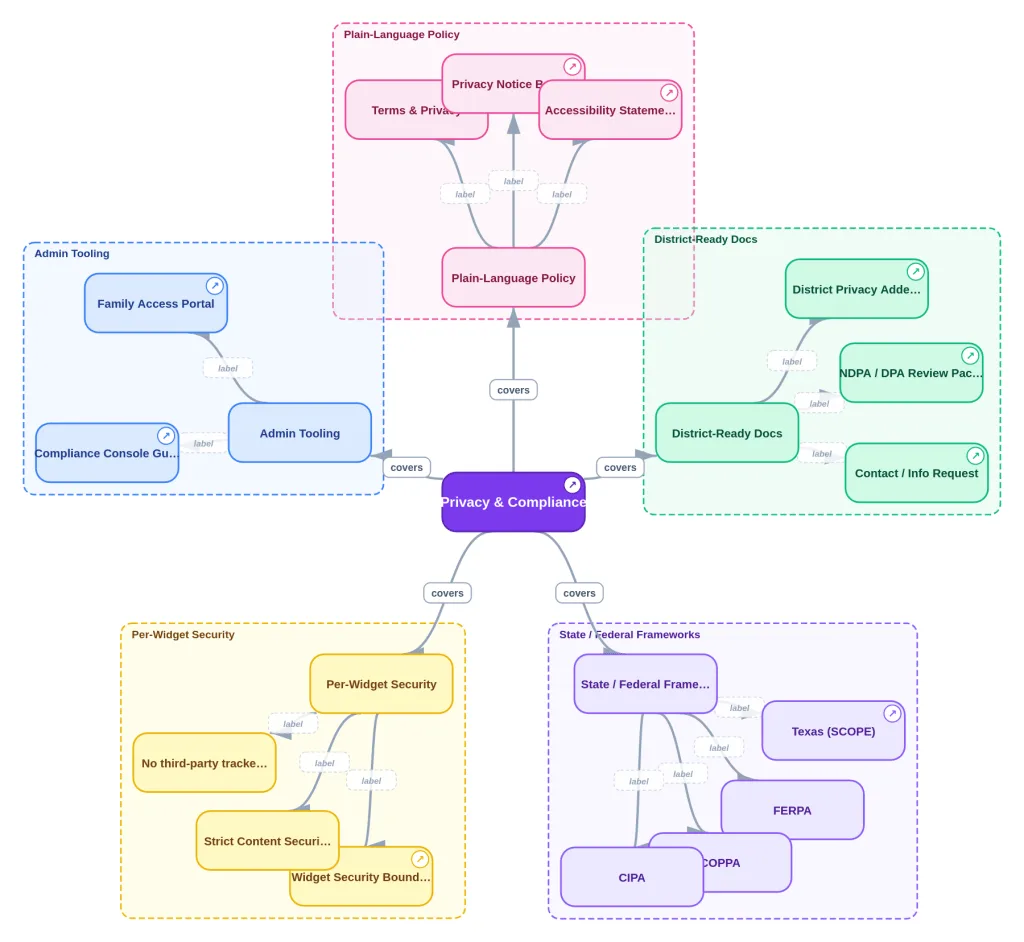
Privacy and Terms of Service
This is the part that I felt quite confident about in preparing, especially since I relied on the TCEA PROTECT rubric (you may recall this blog entry I wrote introducing PROTECT as a way schools and districts could empower their staff to assess any Tom, Dick, and Harry Gen AI tool that came their way). Of course, the PROTECT rubric works for ANY educational technology tool. I suspect that I will have to come up with a Texas edition at some point since all the SCOPE expectations add a whole other level of expectation.
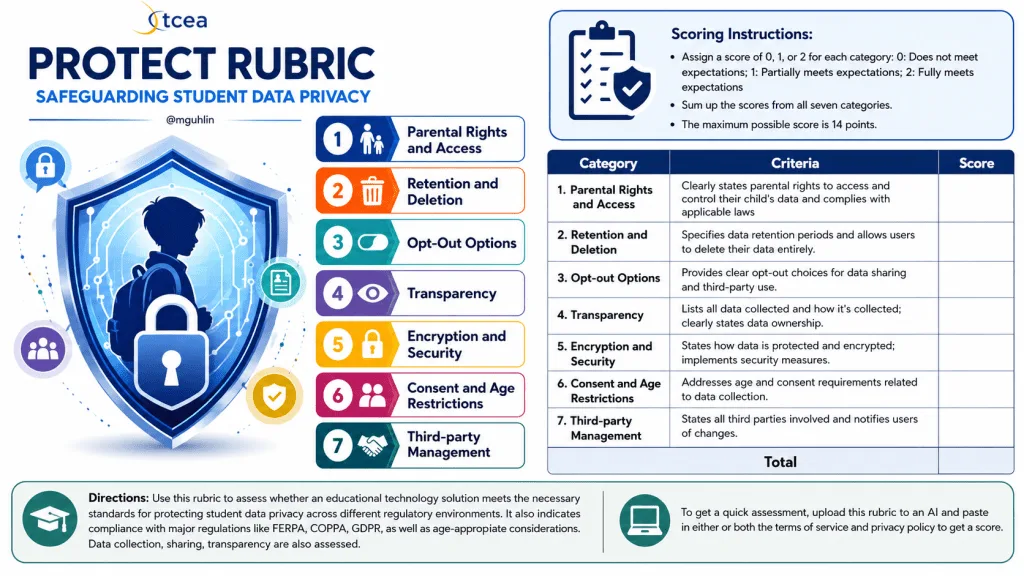
You can use an OpenAI ChatGPT Custom GPT version of the TCEA PROTECT rubric. Or, if you have a BoodleBox account, you can use the Bot version of the PROTECT Privacy Shield. Absent that, copy and paste the image below into your favorite free chatbot (e.g. DeepSeek, Z.AI, Mistral but remember no sensitive info), and use it.
I used the following prompt with the BoodleBox version to get the results below:
Review these documents then score DrawSplat using the rubric:
https://drawsplat.org/legal/terms-privacy
https://drawsplat.org/legal/texas-compliance
https://drawsplat.org/legal/district-addendum
https://drawsplat.org/legal/privacy-builder
https://drawsplat.org/legal/widgets-security
https://drawsplat.org/legal/ndpa-packet
https://drawsplat.org/legal/accessibility
Since writing that prompt, I remembered my old irritation at vendors who didn’t have a SINGLE document with all the components together. DrawSplat, in addition to the separate documents linked above, now has a SINGLE document you can copy and paste into PROTECT GPT or Bot to get an assessment.
So, you may be wondering, “How did DrawSplat do? Can I use it in my school district or at my school?” Again, thanks to Stacy’s feedback, DrawSplat earns a PERFECT score.
TCEA PROTECT Assessment: DrawSplat™
Executive Summary
- Overall Score: 14/14
- Key Strengths: Exceptionally thorough, evidence-backed privacy posture with concrete, demonstrable compliance features (Compliance Console, audit logs, District Privacy Packet). Strong alignment with FERPA, COPPA, Texas SCOPE Act, and CIPA. No advertising, no data sale, no AI training on student data, and no required subprocessors in the default deployment.
- Areas for Improvement: Minor — independent third-party audit (SOC 2/ISO 27001) is explicitly out of scope; some compliance enforcement features are not available in browser-only mode (by design); structured VPAT 2.5 form not yet completed.
Detailed Scoring
Category
Description
Rating
Supporting Evidence
Parental Rights and Access
Clearly states parental rights to access and control their child’s data and complies with applicable laws.
2
Family Access Tools at /parents/ allow parents to view, export, correct, delete, pause, report safety concerns, and ask privacy questions. Teacher-issued one-time 8-character verification code (SHA-256 hashed, 14-day expiry, single-use). Requests acknowledged within 10 school days, completed within 30 calendar days. Explicit FERPA school-official designation and COPPA school-consent framework. Every request action is audited.
Retention and Deletion
Specifies data retention periods and allows users to delete their data entirely.
2
District-configurable archive-after, delete-after, and audit-keep windows in the Compliance Console. Daily Apps Script trigger prunes automatically; manual runs available. Browser-only sessions configurable to expire (e.g., 24 hours). On termination: 30 calendar days for active systems, 90 days for backups when feasible. Admin “Delete Data” button trashes Drive files and removes rows, logged as DATA_DELETED. RETENTION_ACTION audit event for every cleanup pass.
Opt-out Options
Provides clear opt-out choices for data sharing and third-party use.
2
Multiple deployment modes (browser-only, Apps Script, MySQL, self-hosted) let schools opt out of cloud storage entirely. Users may avoid optional uploads, audio recordings, Google/MySQL sync. Parents can pause student account access via Family Access Tools. No targeted ads, profiling, or AI training to opt out of in the first place. Permissions Policy defaults off (no camera/mic/geolocation/payment except explicit microphone for audio notes).
Transparency
Lists all data collected and how it’s collected; clearly states data ownership.
2
Exhaustive data inventory per deployment mode (browser-only / Apps Script / MySQL) with identifiers collected explicitly enumerated. Clear data flow diagrams. Ownership statement: “Users and their schools or organizations retain ownership of board content they create. DrawSplat™ does not claim ownership.” Full subprocessor table with who holds the contract. Version history maintained. NDPA packet provides complete contracting transparency.
Encryption and Security
States how data is protected and encrypted; implements security measures.
2
HTTPS required in production; strict CSP (default-src 'self', frame-ancestors 'none', etc.); encryption at rest required for hosted/MySQL deployments; scrypt+pepper password hashing; least-privilege DB accounts; audit logging; MFA expected for Google storage; 72-hour breach notification SOP with documented triage/containment/notification/remediation phases; annual security reviews required for hosted deployments; vulnerability reporting process. Image upload approval queue with server-side enforcement.
Consent and Age Restrictions
Addresses age and consent requirements related to data collection.
2
Server-locked Student Age Band Lock (under_13, 13_to_17, 18_plus, unknown_minor) — students cannot change; admins can only change with written reason; every change emits AGE_BAND_CHANGED audit event. Default is unknown_minor (safest assumption). Explicit COPPA school-consent-on-behalf-of-parents framework. Texas SCOPE Act age-registration alignment. District must document consent basis, parent notice process, and approved age/grade bands before student use.
Third-party Management
States all third parties involved and notifies users of changes.
2
Default static app has no required third parties. Complete subprocessor table identifying Google Workspace, Google/Microsoft Identity, Clever/ClassLink, Cloudflare Pages — each tied to the district’s own existing contract. 30 calendar days’ notice required for material new subprocessors with right to object, disable, or terminate. No third-party analytics, ads, or trackers on static pages or widgets. CSP enforces this technically.
Total: 14/14
Comparative Analysis
DrawSplat™ represents an unusually strong privacy posture for an educational technology product, particularly notable because:
- Architectural privacy-by-design: Unlike most edtech products that bolt on compliance, DrawSplat’s default static/browser-only mode means there is literally no vendor-side data collection. Districts that adopt the Apps Script mode keep data in their own Google tenant — DrawSplat never holds it.
- Demonstrable, not just declarative: Every PROTECT category maps to a concrete feature with audit events (e.g.,
DATA_EXPORT,DATA_DELETED,AGE_BAND_CHANGED,RETENTION_ACTION,IMAGE_APPROVED). The District Privacy Packet is a one-click ZIP with 90 days of evidence — this is rare. - Open-source + AGPL-3.0: The compliance claims are inspectable in source code, which is a verification advantage commercial vendors cannot match.
- Honest scope limitations: The documents transparently disclose what is not covered (independent audits, full VPAT 2.5, MySQL production hardening, some Texas SCOPE provisions enjoined by court). This honesty strengthens rather than weakens the rating.
Recommendations
While DrawSplat scores full marks against the TCEA PROTECT rubric, the following enhancements would further strengthen the posture for districts with rigorous procurement requirements:
- Pursue an independent audit attestation (even a lightweight third-party penetration test report) for districts whose procurement requires external validation beyond open-source code review.
- Complete the structured VPAT 2.5 to remove a known friction point for accessibility-focused procurement reviews.
- Close the canvas keyboard-accessibility gap so keyboard-only users can create and manipulate whiteboard objects — this is the most consequential accessibility gap currently disclosed.
- Document the MySQL production pilot with a public reference deployment so districts considering the self-hosted path have evidence of in-production behavior.
- Add a public subprocessor change log RSS/email feed so districts get the 30-day notice automatically rather than needing to poll the page.
- Consider honoring
prefers-reduced-motionin upcoming releases to round out the accessibility commitments already in place.