

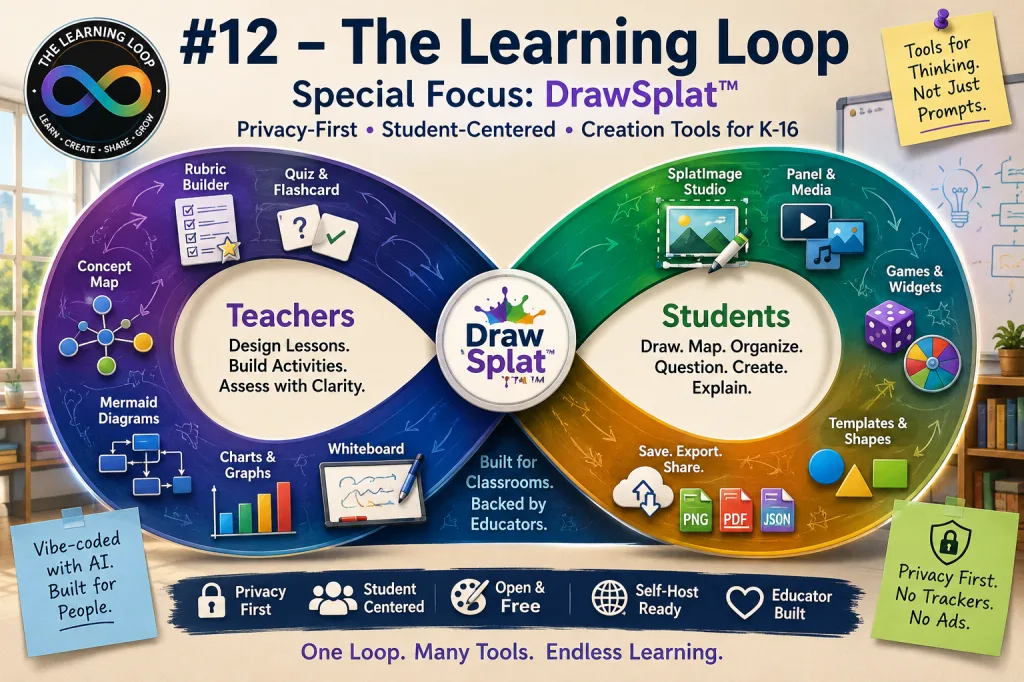
What happens when an educator gets tired of classroom tools that are expensive, overloaded, privacy-complicated, or stuffed with Gen AI features?
In this special focus issue, we look at DrawSplat™, a free, browser-based interactive whiteboard and classroom toolkit built for K-16 educators and students. It brings together whiteboarding, drawing, concept mapping, graphing, quizzes, rubrics, image editing, games, classroom widgets, and self-hosting options into one expanding ecosystem.
The interesting twist? DrawSplat was vibe-coded with AI assistance, but the tools themselves are not Gen AI tools. They give students a place to make, organize, draw, sort, map, chart, study, and explain without turning every classroom activity into another chatbot prompt.
Note: DrawSplat™ is available under AGPL-3.0-or-later or a separate commercial license. Districts should still review local policy, accessibility needs, and data privacy requirements before adopting any classroom tool.

In This Issue
This special issue focuses on DrawSplat™ as a privacy-first classroom creation hub. We look at why it exists, what it offers teachers and students, and how its individual tools support visual thinking, assessment, media creation, and classroom workflow. We also examine the larger question behind it: can educators use AI to build better tools while still keeping students away from unnecessary AI dependency?
Article Navigation
- #1 – DrawSplat Overview
- #2 – Concept Map Studio
- #3 – Mermaid Diagram Studio
- #4 – Quiz and Flashcard Studio
- #5 – Rubric Builder
- #6 – SplatImage Studio
- #7 – Privacy and Compliance
- #8 – Release Notes and Self-Hosting
#1 – DrawSplat Overview
The Big Idea
DrawSplat™ began as a practical educator response to a familiar problem: teachers need flexible visual tools, but many commercial tools are expensive, locked down, overbuilt, or increasingly tangled with Gen AI. DrawSplat aims to give teachers and students a browser-based whiteboard that supports drawing, annotation, panels, media, templates, graphing, diagrams, and classroom workflows.
It is not just a drawing canvas. It is closer to a classroom creation space where students can sketch, label, organize, represent, practice, explain, and share. The key idea is agency: students do the thinking and making.
Putting It into Practice
- Use it as a creation station: Have students explain a process with arrows, labels, sticky notes, and sketches.
- Keep AI out of the student task: Use DrawSplat when the learning goal is student-generated representation, not chatbot-generated response.
- Start with simple mode: For younger students, begin with drawing, shapes, text, and export options before introducing advanced features.
- Use panels for stages: Organize a lesson into “Plan,” “Work,” “Revise,” and “Reflect” panels. Take advantage of a host of templates to organize panels or make your own.
Source: Introducing DrawSplat, A Free Whiteboard Plus Solution | Author: Miguel Guhlin
#2 – Concept Map Studio
The Big Idea
Concept Map Studio is one of DrawSplat’s strongest classroom tools because it supports the kind of visual thinking students often need but rarely get enough time to practice. Students can build concept maps, use graphic organizer templates, save work, export outlines, and move between visual structure and written structure.
That matters because concept mapping makes thinking visible. It helps students show relationships, categories, causes, examples, sequences, and evidence. The tool can also work alongside AI, but the teacher can keep the center of gravity on student sense-making. You can get the format specifications, import into GenAI then have the AI format a summary or outline into a concept map JSON file you can import into the Concept Map Studio.
Putting It into Practice
- Pre-reading map: Before reading, students map what they already know.
- Post-reading correction: After reading, students revise the map and explain what changed.
- Vocabulary web: Students connect new terms to examples, images, and non-examples.
- AI-supported, student-finished: Let AI produce a rough outline only if appropriate, then require students to edit, justify, and improve the map.
- Convert a Markdown-formatted outline into a concept and vice versa (works with Markdown Studio, which comes included)
Source: DrawSplat Feature: Concept Map Studio | Author: Miguel Guhlin
#3 – Mermaid Diagram Studio
The Big Idea
Mermaid diagrams are powerful, but the syntax can frustrate students and teachers who simply want a clear flowchart, sequence, or process map. DrawSplat’s Mermaid Diagram Studio lowers the barrier by putting the editor and preview in one place and making the resulting image easier to copy and reuse.
This tool fits well in classrooms where students need to explain systems: science cycles, historical cause-and-effect chains, writing workflows, coding logic, research steps, or project management timelines.
Putting It into Practice
- Flowchart a process: Students diagram how a bill becomes a law, how water cycles, or how a paragraph develops.
- Debug thinking: Have students compare diagrams and identify missing steps or weak transitions.
- Use diagrams as drafts: Students export diagrams, then annotate them in the whiteboard.
- Teach structure: Use the tool to show that a good diagram depends on clear relationships, not decorative design.
Source: DrawSplat Feature: Mermaid Diagram Studio | Author: Miguel Guhlin
#4 – Quiz and Flashcard Studio
The Big Idea
Quiz and Flashcard Studio gives teachers and students a straightforward way to build question banks, play quizzes, and turn content into flashcards. The important part is not that quizzes exist. It is that students can make study materials without needing a commercial quiz platform or a Gen AI-powered study bot.
The tool also invites a useful classroom shift: students should not only answer questions; they should learn to write better questions.
Putting It into Practice
- Student-made review: Each student contributes three strong questions and one distractor explanation.
- Flashcard reflection: Students mark which cards they missed and write a one-sentence correction.
- Team quiz rounds: Use the quiz mode for low-stakes retrieval practice.
- Question quality check: Ask students to label questions as recall, application, or analysis.
Source: DrawSplat Feature – Quiz and Flashcard Studio | Author: Miguel Guhlin
#5 – Rubric Builder
The Big Idea
Rubrics are easy to generate with AI, but that does not mean students understand them. DrawSplat’s Rubric Builder gives teachers a practical way to create, revise, and print rubrics without relying on an AI system to define quality for them.
This matters because rubrics are not just grading tools. They are communication tools. A good rubric helps students understand what quality looks like before they submit work.
Putting It into Practice
- Co-build success criteria: Show a sample project and ask students to help define what makes it strong.
- Use four-level language: Keep performance levels clear, observable, and student-friendly.
- Print for peer review: Students use the rubric before the teacher ever grades the assignment.
- Revise after use: After one round of scoring, improve unclear criteria.
Source: DrawSplat Feature: Rubric Builder | Author: Miguel Guhlin
#6 – SplatImage Studio
The Big Idea
SplatImage Studio adds a simple image editor to the DrawSplat ecosystem. It includes common classroom-friendly editing needs such as cropping, masks, screenshots with annotation, layers, effects, and multilingual interface support. This is useful because students and teachers often need “just enough” image editing without opening a complex design platform.
It also supports a larger classroom pattern: make media creation accessible, but keep the focus on explanation and communication.
Putting It into Practice
- Crop for focus: Students crop an image to highlight the evidence they are discussing.
- Layer labels: Add arrows, captions, and callouts to explain what matters.
- Create visual vocabulary cards: Students pair an image, definition, example, and non-example.
- Use effects sparingly: Require students to explain how each visual choice improves clarity.
Source: DrawSplat Feature: SplatImage Studio | Author: Miguel Guhlin
#7 – Privacy and Compliance
The Big Idea
DrawSplat’s privacy posture (includes Texas and GDPr support for Europe) is one of the most important parts of the project. Its default static/browser-only mode means standalone tools can run without vendor-side student data collection. The DrawSplat documentation also emphasizes no third-party advertising, analytics, or trackers on static pages and widgets.
For schools, this is the part worth studying carefully. The best classroom tool is not only the one with the most features. It is the one with a data path you can explain to parents, administrators, and students.
Putting It into Practice
- Ask the data question first: What leaves the browser? Where is it stored? Who can access it?
- Use browser-only mode when possible: For quick classroom activities, local work may be enough.
- Review storage choices: If saving to Google Drive or another backend, involve the district technology team.
- Teach privacy literacy: Let students compare tools by data collection, not just features.
Source: DrawSplat™: Privacy and Compliance | Author: Miguel Guhlin
Related: Widget Security Boundary and Data Inventory
#8 – Release Notes and Self-Hosting
The Big Idea
DrawSplat is evolving quickly. The latest release notes point to refreshed self-host bundles, classroom tools, games, SplatImage Studio, SketchSpace VR, and updated blog snapshots. That makes DrawSplat more than a single whiteboard page. It is becoming a deployable classroom toolkit.
Self-hosting matters because it gives districts more control. Instead of asking teachers to send students into another third-party platform, a school system can review, host, and manage the tool in a way that fits local expectations.
Putting It into Practice
- Pilot before scaling: Start with one grade level, PLC, or professional learning group.
- Test exports: Confirm PNG, PDF, JSON, and local save workflows before using with students.
- Document classroom routines: Create a one-page “how we use DrawSplat” guide.
- Involve IT early: Self-hosting is a strength, but it needs a responsible technical owner.
Source: DrawSplat™ Release Notes | Author: DrawSplat.org
Tech Alert: Not Every Classroom Tool Needs AI
The most important DrawSplat lesson may not be about whiteboards at all.
It is this: educators can use AI to build tools, but students do not need AI inserted into every learning activity. There is still value in drawing a diagram, organizing a concept map, building a rubric, creating a graph, editing an image, and explaining thinking in your own words.
The classroom question should not be, “Where can we add AI?”
A better question is, “Where does the student need to do the thinking?”
Must Read / Explore
- DrawSplat.org – Main site for the whiteboard, tools, widgets, games, support, privacy, and self-hosting information.
- DrawSplat Blog RSS – RSS feed for DrawSplat posts and updates.
- DrawSplat Blog Page – Browser-friendly page for posts about DrawSplat.
- Widget Security Boundary – Data inventory explaining what each widget stores or transmits.
- Release Notes – Current stable version details and self-host bundle notes.
Notable DrawSplat Tools
- Open Whiteboard: Browser-based whiteboard for students, teachers, teams, and workshops.
- Concept Map Studio: Visual organizer for mapping relationships, outlines, and ideas.
- Mermaid Diagram Studio: Diagram maker for flowcharts, process maps, and structured visuals.
- Quiz and Flashcard Studio: Tool for building question banks, quizzes, and study cards.
- Rubric Builder: Printable rubric creator with editable criteria and performance levels.
- SplatImage Studio: Simple image editor with cropping, masks, layers, and visual effects.
- Chart Studio, Graph Maker, and Picture Graph: Classroom graphing tools for visual data work.
- DrawSplat Games and Widgets: Lightweight classroom interactives, including coin flip, dice, wheel spinner, puzzles, and games like Squirrel Run, Star Trek, GilaSplat, Dots and Boxes, Castles and Catapults.
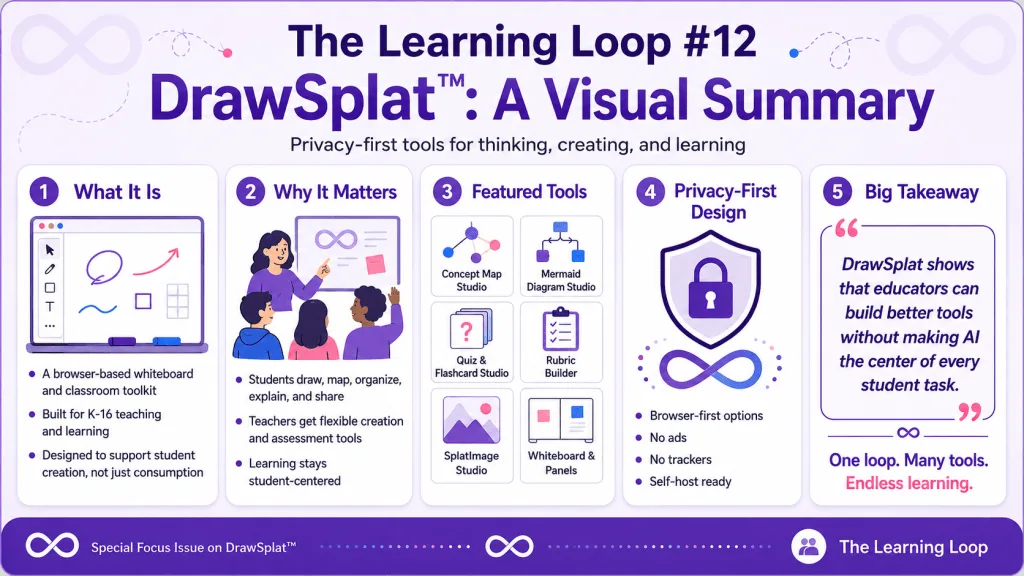
Bottom Line: DrawSplat™ is worth watching because it points to a healthier edtech pattern: privacy-first, teacher-shaped, student-facing tools that support creation without making AI the center of every classroom task.
Note: This newsletter provides original commentary and summaries of publicly available sources for educational and informational purposes. Readers are encouraged to visit the linked sources for the full context. Article images are represented with placeholders unless separately licensed or created for this issue.